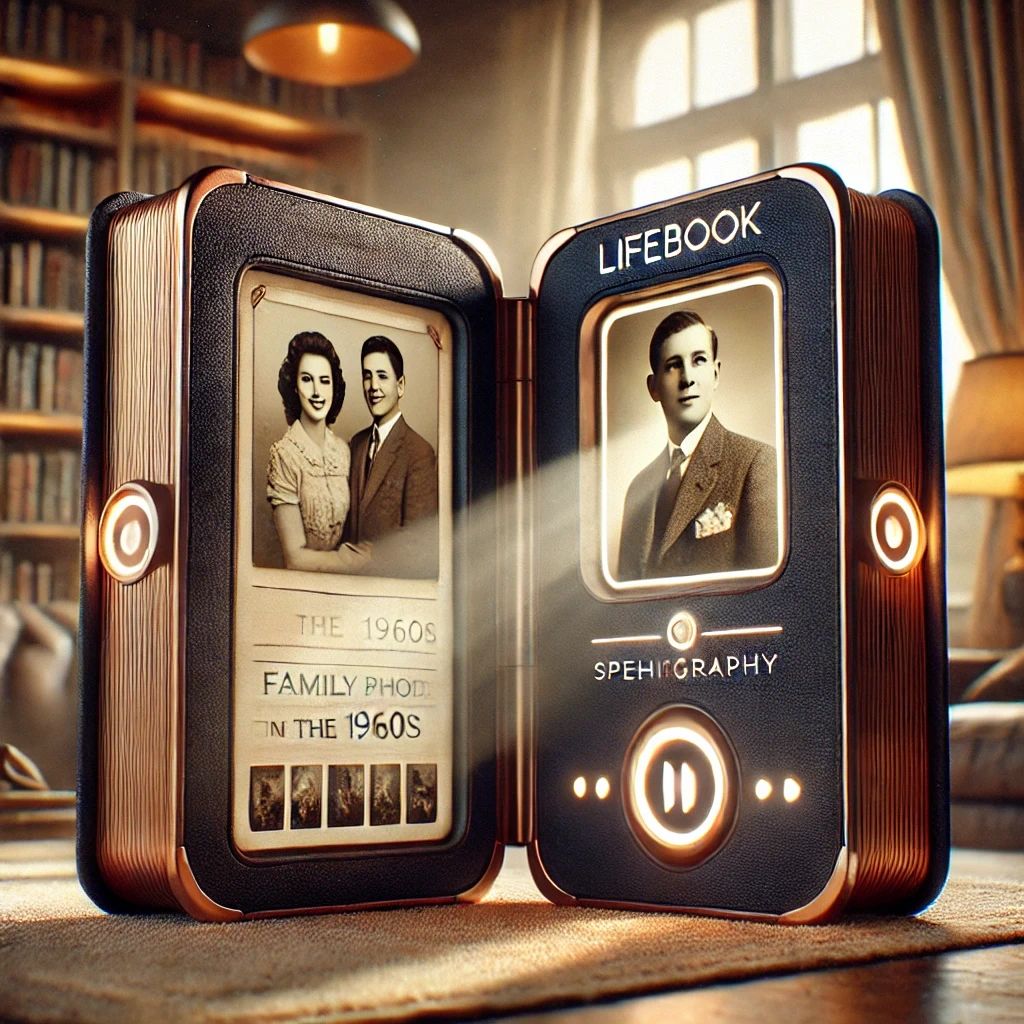
At Voice of Reason, our mission is not just about harnessing advanced AI technology; it’s about creating an experience that empowers individuals. The LifeBook, at the heart of our product line, is designed to be much more than a high-tech gadget—it’s a legacy, a personalized biography for individuals that bridges generations.
But the LifeBook’s purpose extends even further. A detailed and comprehensive biography is essential for enabling Voice of Reason’s “Whisper” product, a social aid designed to help individuals with memory loss live more independently. Whisper delivers timely, personalized hints and reminders to users, assisting them in navigating daily life. To provide these meaningful insights, Whisper relies on a rich understanding of the user’s life history, relationships, and experiences—data that the LifeBook is uniquely positioned to gather and preserve.
This post delves into the design approach that ensures the LifeBook is not only innovative but also deeply personal, accessible, and intuitive.
The Vision Behind LifeBook
The LifeBook aims to marry the timeless charm of a physical book with the sophistication of modern technology. The product opens to reveal two high-quality touchscreens, which resemble the pages of a traditional book, inviting the user to embark on a journey through their life story. But the LifeBook is not just a display tool—it’s a dynamic biographical companion. Whether collecting life stories through an interactive AI interview or narrating a personalized biography using photos, documents, and verbal input, the LifeBook is a bridge between the past, present, and future.
The Key Modes of Operation
The LifeBook supports two primary modes of interaction, each designed with user experience and accessibility in mind. These modes—Biography Creation and Biography Narration and Display—are more than just functional; they reflect our desire to create an intimate and interactive experience for every user.
Biography Creation
When the user begins the process of creating their biography, the LifeBook’s UI must guide them through a carefully structured interview. The design of this mode is centered on ensuring the subject feels comfortable, engaged, and in control of their story.
The interview UI in LifeBook is designed to keep the experience as natural and inviting as possible. As the subject recounts different aspects of their life, the LifeBook dynamically updates the general outline of the biography. Imagine a subject speaking about their childhood—at this moment, the screen will show a heading such as "Early Years" or "Childhood Memories." These categories will appear on the screen in a visually appealing manner, with smooth transitions to ensure the user never feels overwhelmed. The life story is segmented, but in a way that feels like a natural flow, rather than an interrogation.
This structured presentation is far from rigid, though. The outline serves as a guide, but it is flexible, allowing the user to move freely between life stages and events. This structure ensures that the biography remains coherent, even as the subject may recall memories out of order. The reason for this approach is simple: it mirrors how humans naturally recall their memories—not in linear timelines, but in thematic chunks. Life’s stories often emerge as a series of interconnected moments, and the UI respects this fluidity.
The era-specific visuals accompanying each section serve a dual purpose: first, to immerse the user in the context of their story, and second, to act as a prompt. When the subject mentions a particular year or event, the LifeBook pulls up relevant photographs or historical imagery, enriching the storytelling experience. This integration of imagery is not just decorative; it plays a psychological role in triggering deeper memories, inviting the subject to expand on their narrative. For instance, a family photo from the 1980s might prompt the subject to recall their first car or an unforgettable trip they took during that time.
At the heart of this interaction is the speech activity indicator. It might seem like a simple feature, but its role is crucial: as the subject speaks, an indicator (like a glowing ring or pulsing line) will confirm that their voice is being captured. This feedback reassures the subject that they are being heard, particularly important for those who may be less familiar with technology. The indicator also provides a visual cue that encourages the subject to continue speaking. The goal is to create a seamless, almost subconscious interaction where the subject focuses purely on telling their story, not on navigating technology.
AI-driven prompts will appear on the screen, guiding the conversation and inviting further elaboration. These prompts are designed to be subtle, always open-ended and conversational. For instance, after the subject shares a memory about their childhood, the LifeBook might ask, “What made this experience special?” or, “Who were the people most important to you at this time?” These prompts are not intrusive; instead, they create an atmosphere of trust, encouraging the subject to share more. The LifeBook’s AI listens attentively, processing the conversation in real-time and generating appropriate follow-up questions.
But the AI is not just a passive listener. It responds audibly and visually. For example, the LifeBook might say, “What a wonderful story about your childhood! Would you like to share more?” This auditory response is paired with visual text that reinforces the connection between the spoken words and the unfolding biography. The AI’s voice and visual displays act as a supportive companion—the LifeBook is not only asking questions, but it’s also making the subject feel heard, understood, and valued.
There’s also a level of dynamic adaptability in the interface. If the subject becomes nostalgic or emotional while recounting a particular moment, the UI can adjust the atmosphere by softening the visual elements and offering reassuring audio cues. This empathetic response is crucial for making the user feel safe and comfortable throughout the process, especially when discussing deeply personal memories.
Biography Narration and Display
Once the biography is created, the LifeBook transitions into the Biography Narration and Display mode, where it becomes a personalized storyteller. In this mode, the LifeBook is tasked with engaging the subject or any listener, whether it’s a family member or friend, with a living, breathing biography.
The LifeBook’s narrative abilities are what make it stand apart. When the subject or another person asks a question—say, “What was Grandpa like as a young man?”—the LifeBook not only provides an answer but also narrates the story using a combination of voice, text, and images. This dynamic, multi-modal narration ensures that the biography feels interactive and alive. Instead of reading a static text, the user experiences the biography as a story that unfolds in real-time, with multimedia cues to enhance engagement.
The visuals during this phase are critical. The LifeBook displays images and videos from the subject's life, dynamically integrating them into the narrative. For example, as the AI narrates a story about the user’s wedding, a photo of the wedding day might be shown on the screen, followed by a short video clip from that event. This multimedia integration deepens the emotional impact of the biography, creating an immersive storytelling experience.
Why This UI Approach?
The design decisions for the LifeBook’s UI are not arbitrary. Each element—from the dynamic outlines to the real-time speech activity indicators—is grounded in the goal of creating a natural, engaging, and personal experience. The LifeBook is designed to serve as a companion to the user’s memories, not just a tool for recording facts. Its interface is intentionally simple, but each feature is thoughtfully integrated to enhance the experience and create a sense of emotional connection. The ultimate goal is to allow users to share their life stories in the most comfortable, intuitive way possible.
We chose to emphasize voice-driven interaction because we understand that for many, speaking comes more naturally than typing. For seniors, individuals with learning disabilities, or those with memory conditions, voice-based interaction lowers the barrier to participation. Real-time feedback, whether through visual cues or audio prompts, ensures that the experience feels immediate and responsive, helping users stay engaged in the process of storytelling.
Moreover, the inclusion of visual elements—such as era-appropriate imagery and photos—was a conscious choice to enhance memory recall and make the experience feel more authentic. Memories are not just words; they are accompanied by emotions, sensations, and visuals. By weaving these elements into the LifeBook’s design, we help create an experience that honors both the story and the storyteller.
Challenges and Innovations
Designing the LifeBook comes with its own unique set of challenges. One of the most difficult aspects is balancing the timeless nature of the product with the ever-evolving world of technology. We wanted the LifeBook to feel like a family heirloom—a beautiful object that could sit on a bookshelf for generations. But it had to be technologically advanced enough to support dynamic AI conversations, voice recognition, and multimedia integration.
Another challenge was creating a UI that would be universally accessible—this includes people who are unfamiliar with technology, those with physical impairments, or even individuals who might experience cognitive challenges. To address this, we prioritized simplicity and ensured that every part of the interface is as intuitive as possible. Voice commands, large text, and easily adjustable settings make it suitable for anyone, regardless of their technological expertise.
Conclusion
The LifeBook is more than just a technological marvel; it’s a personal archive that brings the stories of one’s life into the future. Through thoughtful UI design, we’ve created an experience that is not only powerful but deeply personal. The LifeBook encourages users to share their stories, preserving memories for generations to come.
This blend of storytelling and technology, underpinned by intuitive design, is what makes the LifeBook truly special. As it transitions from a simple tool to a cherished family heirloom, we look forward to helping people document their most precious memories.
What would you like your LifeBook to say about you? Let’s build a future where every story is told.